

Pooling on needle seat
Issue
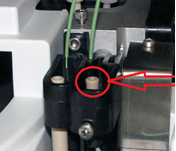
There is pooling on my needle seat.
Environment
AS-AP Autosampler
Resolution
- Check for a leaking fitting and tighten.
- Check the sampling needle; if the needle tip appears worn or damaged, replace the sampling needle.
- If fluid appears on the top of the injection port during injection, the needle may not be reaching the correct depth in the port or may not be aligned over the injection port. Realign the sampling needle. (J-Clip will be needed)
- Air in the sample transfer line can cause continued flow after the syringe pump has stopped. Make sure all lines are primed and free of air bubbles. Refer to the AS-AP Operator’s Manual for priming instructions.
- If pooling continues disconnect blue line going to Diverter valve or the injection valve of the system. (Single system configuration has no diverter valve, Dual System Configuration has a diverter valve)
- Press the Wash Sample LOOP and set volume to 500uL on the sampler Tab on the Instrument Control Panel (see picture).

- If still pooling please replace the blue tubing from the injection port to the injection valve/diverter valve. If no pooling, please move to next step
- If pooling occurs when reattaching the blue tubing, the injection valve/diverter valve needs to be cleaned or rebuilt.
- Take 3 allen screws off from valve front

- Remove the rotor and stator and sonicate in 50/50 methanol/DI (picture below)


- Make sure you can see light through 6 small openings in stator. (round disc). Also verify you can see light through stator face (the tan colored piece where you took off the allen screws, look through all 6 ports from front to see light.)

- If you cannot see light through the ports, hook up syringe or pump and clear blockage of stator.
- Once you have verified no blockages in the valve reassemble the valve and hook a fluid connections back up and run step 6 again.
- Take 3 allen screws off from valve front
- If pooling still occurs please call Tech Support.
Attachment(s)
| File | Last Modified |
|---|---|
| pooling - image 05.png | January 12, 2022 |
| pooling - image 04b.png | January 12, 2022 |
| pooling - image 04a.png | January 12, 2022 |
| pooling - image 03.png | January 12, 2022 |
| pooling - image 02.png | January 12, 2022 |
| pooling - image 01.png | January 12, 2022 |