

How to fix strange characters in OMNIC
Issue
On a recent site visit the µ/micron/mu symbol disappeared from Experiment Set Up – it was replaced by a rectangle or random character/fractions. See Figure 1 below:
Figure 1

Environment
Dispersive Raman
Resolution
The problem is created/solved by changing a well hidden language setting.
|
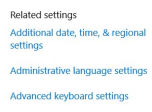
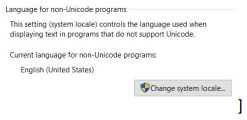
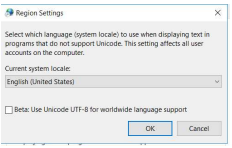
From the Windows language, settings look for ‘Administrative language settings’ (Figure 2) From here, find the ‘language for non Unicode programs/system local’ (Figure 3) The key here is to ensure that the Beta check box is not checked (Figure 4) |
Figure 2
Figure 3
Figure 4
|
Attachment(s)
| File | Last Modified |
|---|---|
| strangechar_figure04.png | December 17, 2021 |
| strangechar_figure03.png | December 17, 2021 |
| strangechar_figure02.png | December 17, 2021 |
| strangechar_figure01.png | December 17, 2021 |